

Jul 6, 2026
Release 117 speeds up your data and cuts friction in the field. Every customer can now export large asset lists in the background — delivered straight to your inbox — and read ticket PDFs in a clean landscape table layout. Out in the field, staff can scan an asset's QR code to upload documents instantly (including .eul files) with no sign-in required.
We're also opening a new mouse-free Ctrl+K / Cmd+K command menu for the web app to Closed Beta, alongside two upgraded betas — fully offline reservations for mobile operators and a more transparent Robots Dashboard for mixed-brand fleets.
 Command Menu (Ctrl+K/Cmd+K) (Closed Beta)
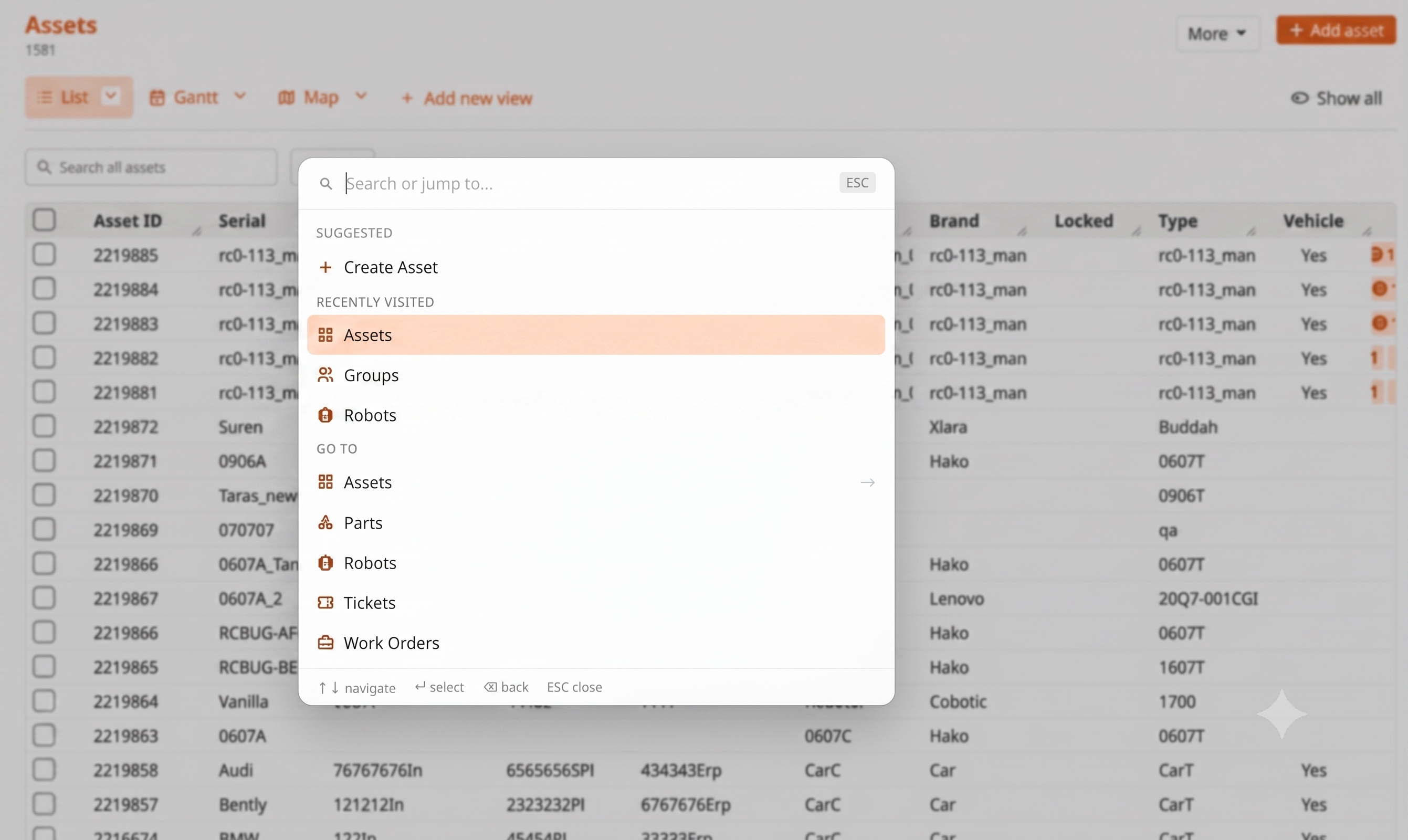
Navigate the entire web app without touching the mouse.
Instant Navigation: Press Ctrl+K (Cmd+K on Mac) to search every page and jump straight to it.
Recent Pages: Quickly return to the pages you visited most recently.
Quick Actions: Run common actions like Create Asset, Create Ticket, or Create Reservation directly from the menu — all respecting your existing permissions.
Not enabled by default — ask your ToolSense CSM to activate it for your organization. We are looking for feedback, and get it to everyone as soon as possible.
Who can use it: All web users, limited to the actions their permissions allow.
 Reservations on Mobile (Closed beta)
A complete Reservations workflow, now in your pocket — with offline support.
Browse & Search: View and search all reservations directly in the mobile app.
Issue From a Ticket: Hand out reserved assets straight from a ticket.
Flag Problems: Report issues on individual reserved items; flagged assets are automatically excluded from new reservations.
 Robots Dashboard & Integrations Update (Closed beta)
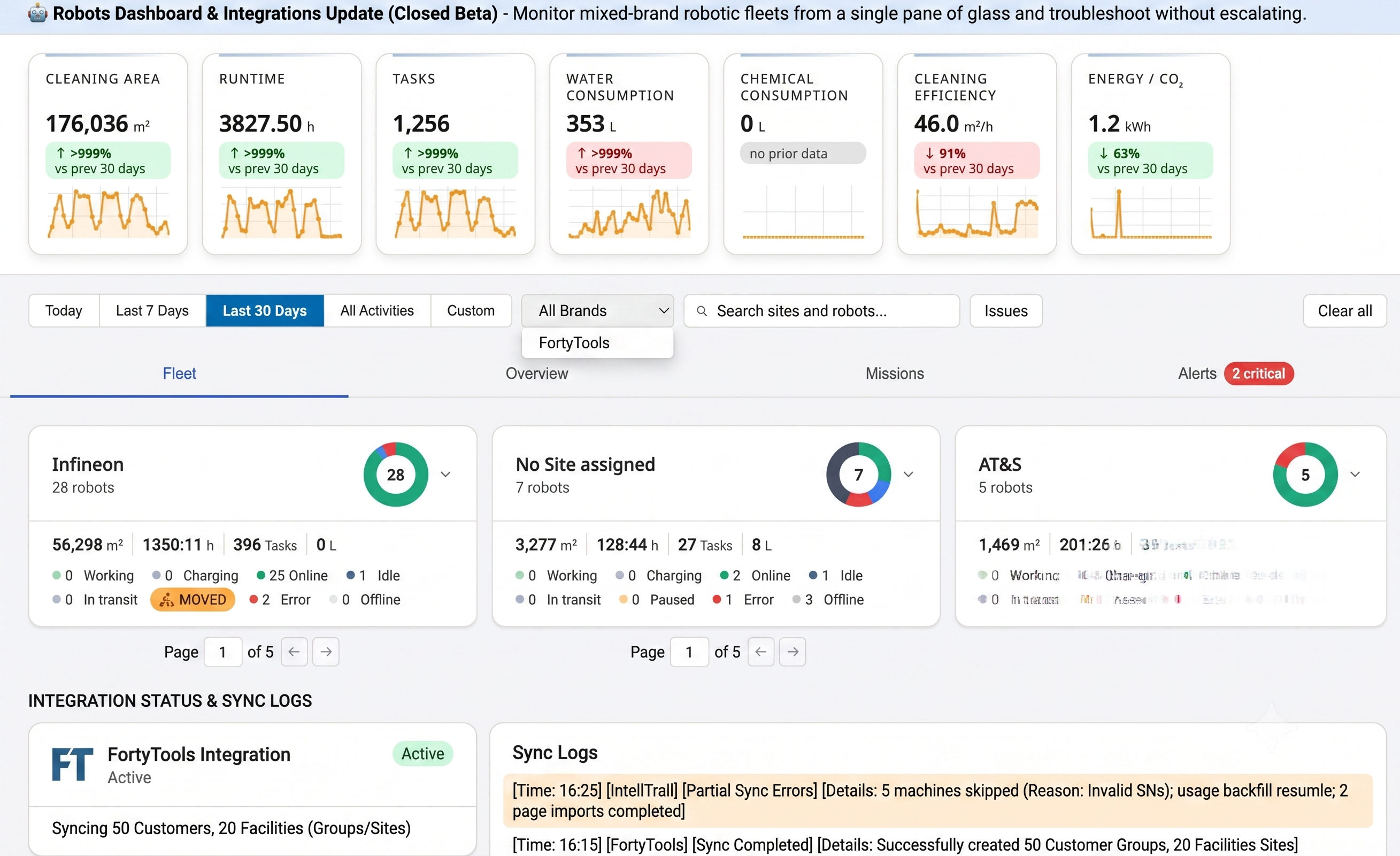
Monitor mixed-brand robotic fleets from a single pane of glass and troubleshoot without escalating.
Unified Dashboard: Filterable, paginated Sites view with clearer statuses and a "Moved" badge for reassigned robots.
Sync Transparency: Runs now report how many machines were skipped and why, instead of dropping them silently — and partial sync errors surface in the sync logs.
New Integration: FortyTools (syncs customers and facilities as groups and sites).
IntelliTrail Reliability: Faster, more reliable syncing with automatic retries, complete page imports, and resumable usage backfill.
\
 Asset List Export for Large Fleets
Export any asset list, even with tens of thousands of assets, without timeouts.
Background Exports: Large exports now run in the background — even for fleets with tens of thousands of assets.
Email Delivery: You receive an email with a download link as soon as the file is ready.
 Maps & Vehicles
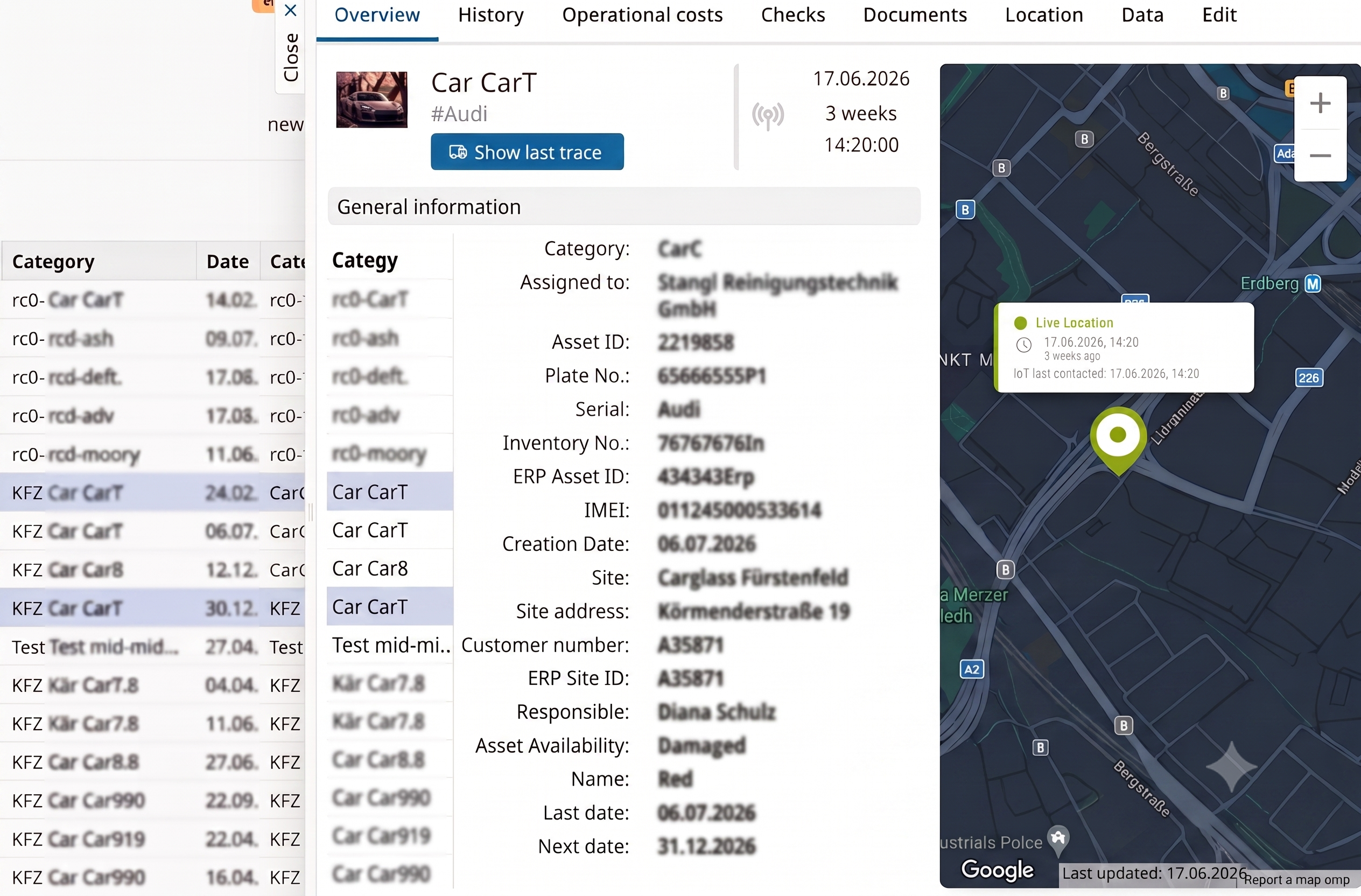
Clearer location context for your vehicles and trips.
Interactive Location Maps: Vehicles now show interactive maps on the asset overview and location pane, including a pin for the assigned site.
Private Trip Traces: Trip traces indicate where a private trip occurred, so routes no longer appear broken — with speeds and distances following your km/miles preference.
 Sharper, Shorter Ticket PDFs
Cleaner ticket documents and email attachments — especially for tickets covering multiple assets.
Wide Tables, Cleanly Split: Tickets with wide input tables now export in landscape with tidy column pagination — no more cramped or cut-off columns.
Polished Rendering: Section breaks stay intact, images render correctly in headings, and dates follow your locale's format throughout.
 Document Upload via QR Code
Attach files to an asset straight from its QR code, no login required, with support for proprietary .eul files.
On-the-Spot Uploads: Scan an asset's QR code and attach documents directly from its landing page. Perfect for field staff capturing paperwork without opening the full app or signing in.
.eul File Support: ToolSense now accepts Oracle .eul files alongside all existing document formats, so specialized equipment metadata can live right on the asset.
Who can use it: Anyone who can scan the asset's QR code, no account required. Uploads are rate-limited to protect against spam.
 Improvements & Bug Fixes Mobile Features & App Stability
Improved NFC Scanning: Enhanced the reliability and responsiveness of NFC scanning.
Unified Asset Filters: Introduced a new mobile date filter to match the web experience, and resolved an issue where the asset filters panel would initially open blank while operating in offline mode.
 Other Improvements
Bulk Delete for Sites: Now available via Mass Edit (requires the Mass Edit feature to be active for your organization).
Asset Group History: Group changes are now recorded in the asset history.
Scoped Serial Checks: Serial number duplicate checks are now scoped to your organization, preventing false warnings.